Smarter Task Management for Timely Delivery

Task management is not just about making a to-do list. It means keeping track of every task from start to finish, assigning work to the right team members, and setting deadlines so projects are completed on time. Business i task management software helps teams in India work faster, stay organized, and get better results.

Why Choose Business i for Task Management?

Manage Tasks Without the Hassle

With Business i Task Management, you can easily create tasks, assign them to the right people, set deadlines, and track progress in one place. Every step is organized and recorded, so your team always knows who is doing what and when it needs to be done. This keeps work clear, on time, and stress-free.

Work Together Seamlessly from One Place: Easily assign tasks to your team members, add important files, and keep the conversation going with comments or built-in chat. Everyone receives instant notifications whenever something is updated, so your whole team stays connected and on the same page throughout the project.

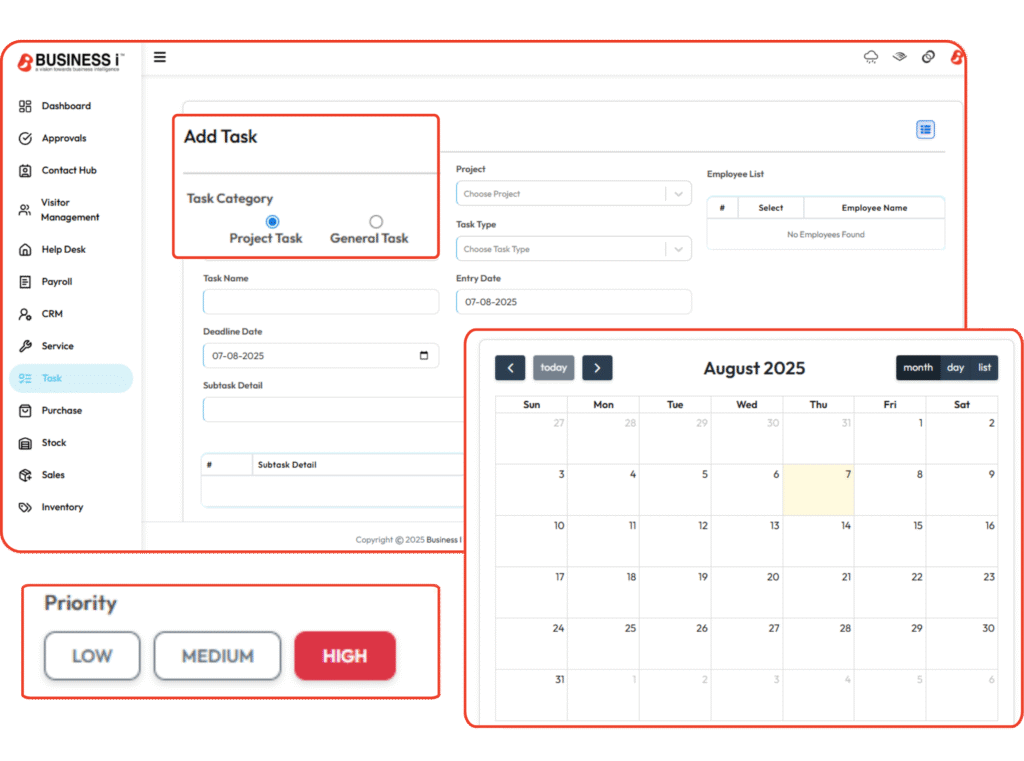
Set Clear Deadlines and Focus on What Matters First: Use the visual calendar or Kanban board to easily assign due dates for each task and subtask. This helps your team stay organized and aware of upcoming deadlines. You can drag and drop tasks to reorder them based on changing priorities. By tagging tasks with urgency levels or categorizing them by complexity, your team will know exactly what needs immediate attention and what can wait.

Delegate and Collaborate from a Central Hub: Easily assign tasks to the right team members and make collaboration seamless by keeping everything in one place. Attach important files, documents, and links directly to each task for quick reference. Share updates, give feedback, and ask questions using comments or instant messaging, reducing the need for endless emails. Real-time alerts and notifications ensure that everyone is informed of changes, progress, and deadlines.

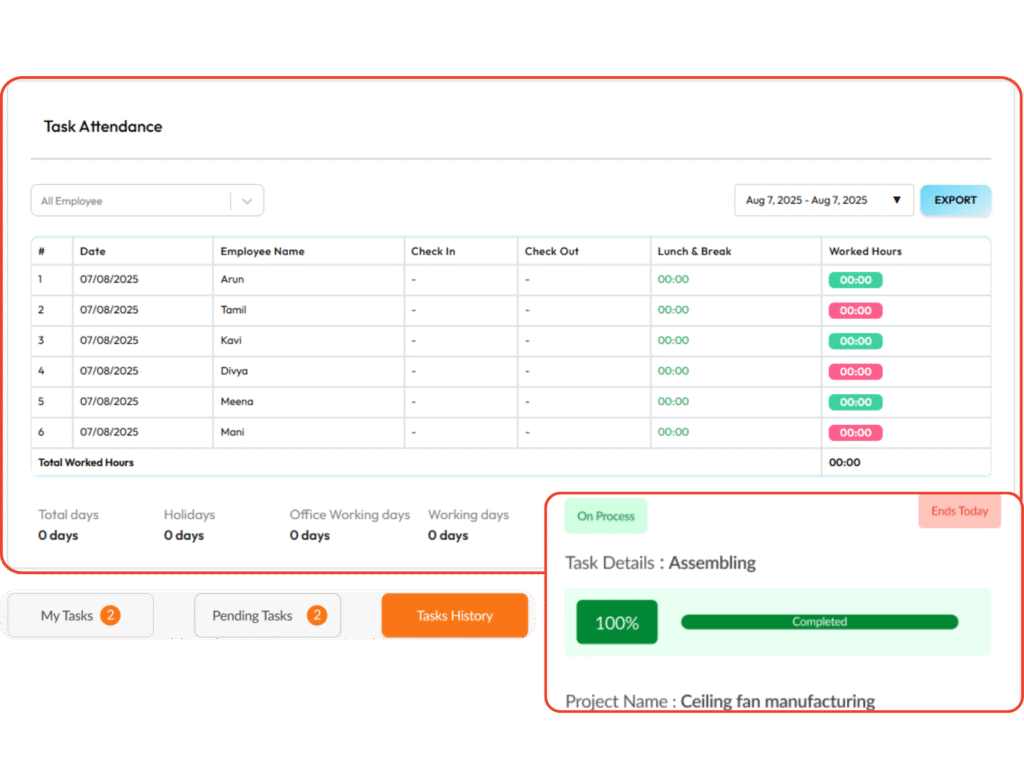
Track Workload and Time with Precision: Keep a clear view of how your team is spending time across projects using built-in time tracking tools. Monitor individual employee timesheets to understand daily efforts and workload distribution. Identify which projects or tasks take up the most time and uncover bottlenecks that slow progress.

Visualize Tasks with Kanban and Calendar Views: Stay on top of your work by viewing tasks in a way that makes sense to you. Use the Kanban board to see progress at a glance with clear status labels like Not Started, In Progress, or Completed. Prefer a timeline? Switch to the calendar view to manage deadlines visually.

Evaluate, Improve, and Deliver with Confidence: Monitor how your projects are performing with clear progress reports from each team. Get complete visibility into who is doing what, how long tasks are taking, and where delays might happen. With accurate data at your fingertips, you can spot problems early, make better decisions, and keep every department aligned. 
Make Every Project a Success from Planning to Delivery

Bring Innovation to Your Company

Start planning your vacation with our trip guides, It’s time to explore the world. Capture everything!

Zoho

Lorem ipsum dolor sit amet, consectetur adipiscing elit. Ut elit tellus, luctus nec ullamcorper mattis, pulvinar dapibus leo.

SAP

Lorem ipsum dolor sit amet, consectetur adipiscing elit. Ut elit tellus, luctus nec ullamcorper mattis, pulvinar dapibus leo.

Add a heading (9)

Business i

Lorem ipsum dolor sit amet, consectetur adipiscing elit. Ut elit tellus, luctus nec ullamcorper mattis, pulvinar dapibus leo.

Manage All Your Tasks and Projects with Business i

Track Time and Progress

Monitor task completion status and employee hours from a single dashboard. Gain real-time insights into where your team’s effort is going and identify bottlenecks to improve productivity.

Break larger tasks into smaller, actionable subtasks to avoid confusion. This makes responsibilities clear and helps team members focus on one step at a time without losing sight of the bigger goal.

Stay ahead of your schedule with automatic reminders, due date alerts, and calendar views. This ensures your team is always aware of upcoming deadlines and delivers work on time.

Attach important documents, notes, and updates directly to tasks. Team members can leave comments, ask questions, and stay informed streamlining communication and reducing the need for extra meetings.

Save time on repetitive work by setting tasks to recur daily, weekly, or monthly. This ensures routine operations are never forgotten and helps you maintain consistency across workflows.

Prioritize Tasks and Hit Deadlines with Business i Task Manager

Stay on top of every project, delegate tasks easily, and meet deadlines—without the chaos.

Why Businesses Trust Business i Task Management?

0 +

Support Given

0 +

Clients Rating

0 M +

Money Saved

0 +

Happy Clients

Frequently Asked Questions

Users and teams can use Business i task management software to manage individual tasks and organize a user’s daily workflow. Task management software enables them to be tracked separately from larger team and project goals.

Users are usually able to create, update, and edit the tasks that have been assigned to them. This type of software can be used by administrators to assign tasks and track progress.

Task management software accomplishes this by generating to-do lists with start and end dates, outlining components for larger tasks, categorizing tasks, and separating individual tasks.

Business i Task Management can be used in almost any type of small businesses where people need to keep track of their daily, weekly, and monthly tasks.

Business i Task Management improves productivity by organizing work into clear tasks and timelines, assigning responsibilities, and enabling real-time collaboration.

All-in-One Task Management Software Designed for Smarter Team Productivity